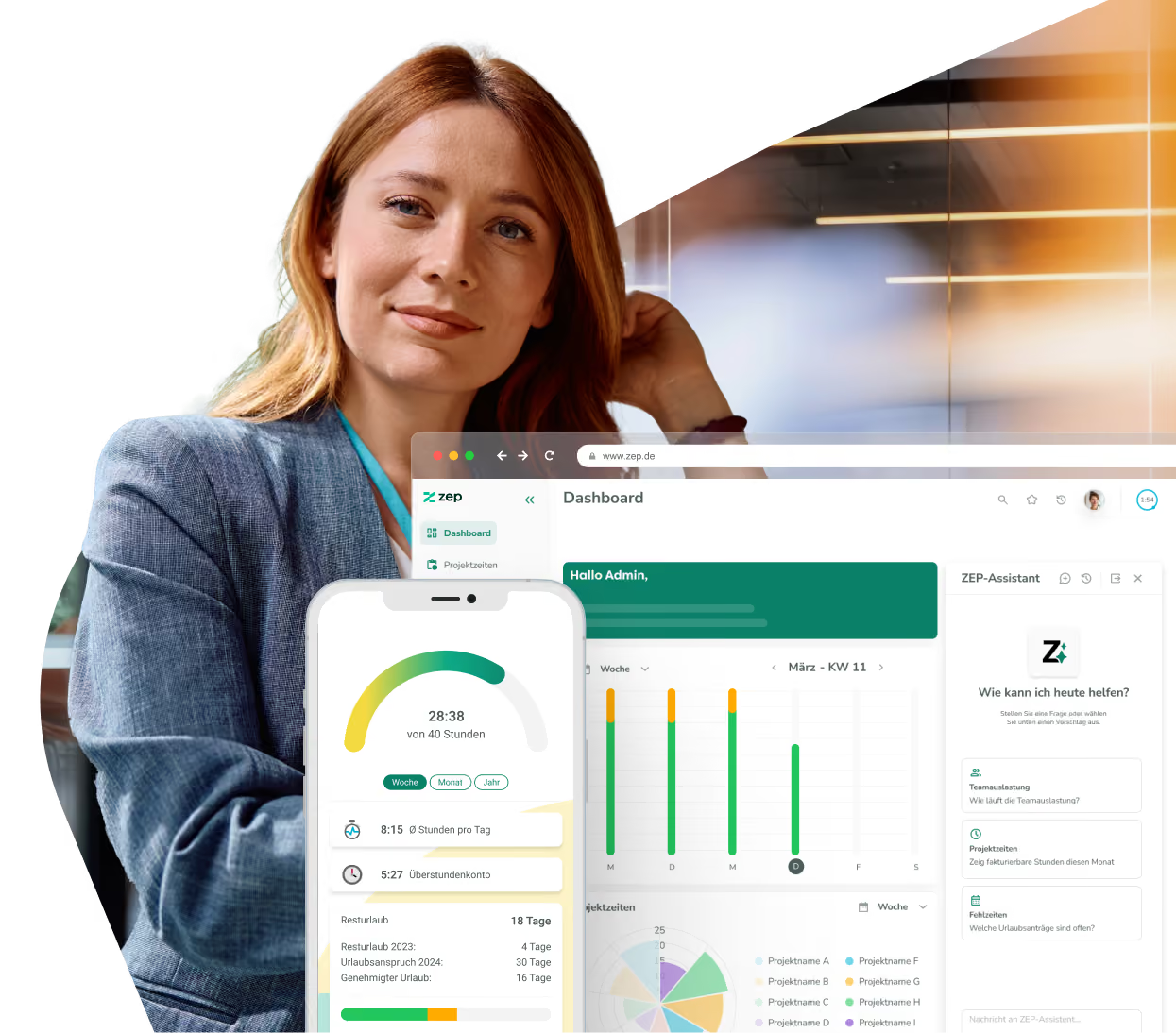
Plan projects and see what you're earning at the touch of a button
Say goodbye to cumbersome Excel spreadsheets! Track your working hours per project and client, and keep an overview of all services and time spent.


Over 3,000 companies rely on ZEP for project time tracking



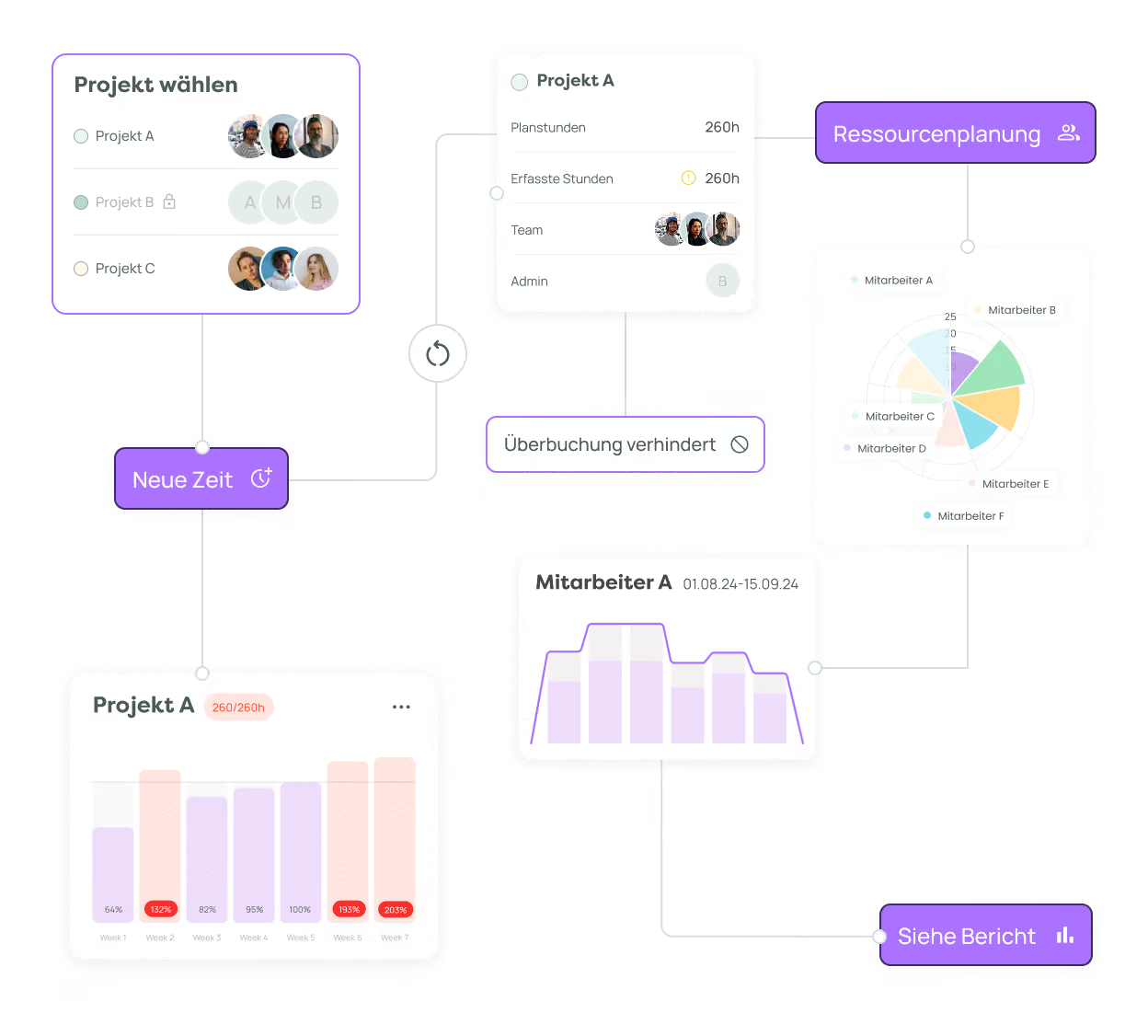
Planning and booked hours on a single database
With ZEP Compact, your employees complete project time recording and project controlling in accordance with the law and completely without paperwork.

Plan target hours and compare them with actual hours
Set fixed or dynamic planning figures and manage your orders bottom-up or top-down. Overbookings are flagged while there is still time to make changes.
Notifications when 75% of available hours are used help project managers react early.

Notifications when 75% of available hours are used help project managers react early.

See what a project earns alongside what it costs
Set rates, compare projected revenue against internal costs, and determine profitability from the same entries used for your reports. This allows you to see if a project is profitable while it is still ongoing, rather than waiting until the final post-calculation.
“This makes it clear how much effort is actually going into client projects – a prerequisite for accurate billing and well-founded post-calculations.”

“This makes it clear how much effort is actually going into client projects – a prerequisite for accurate billing and well-founded post-calculations.”

Create, assign, and organize tasks via board
Create to-dos and work packages, assign them, and organize them using drag-and-drop on the board. Tasks are linked to the same project structure where your team logs their hours, so you always see the effort alongside the status.
“ZEP helps us bring transparency to complex project structures and enables reliable allocation of time to tasks, teams, and clients. This makes it much easier to manage both capacities and budgets.”

“ZEP helps us bring transparency to complex project structures and enables reliable allocation of time to tasks, teams, and clients. This makes it much easier to manage both capacities and budgets.”

Identify bottlenecks before they impact your projects
Availability, utilization, and billing rates are available as key metrics, not just as table exports. This lets you see who still has capacity and where a team is already exceeding its plan.
“The dashboard display allows me to keep an eye on the KPI for the share of billable hours at all times, without having to run a detailed report.”

“The dashboard display allows me to keep an eye on the KPI for the share of billable hours at all times, without having to run a detailed report.”


Digitize your project business now

More than 3,000 companies already rely on ZEP
The time tracking of choice — from startups to large corporations.




.avif)


“Ideal employee management support thanks to a 360 degree view of employee availability, daily reports and automated vacation and absence management.”

“Comprehensive solution for recording project and working times. In particular, compliance with legal regulations (minimum rest time, break times, maximum working hours, etc.) can be tracked very well. “

“We have been using ZEP for over 10 years to record working hours (billable, non-billable). This is a great basis for invoicing our customers.”

“ZEP impresses with its intuitive time and project management and offers excellent customer support!”

“Quick project bookings and evaluations. Yet a high degree of flexibility. Good modular design. You can easily adapt the system to your own needs.”

“We use ZEP for precise time recording, vacation management and absenteeism. With ZEP, our employees can also record their working hours while working from home, which enabled us to replace several previously used tools.”

“Ideal employee management support thanks to a 360 degree view of employee availability, daily reports and automated vacation and absence management.”
“Comprehensive solution for recording project and working times. In particular, compliance with legal regulations (minimum rest time, break times, maximum working hours, etc.) can be tracked very well. “
“We have been using ZEP for over 10 years to record working hours (billable, non-billable). This is a great basis for invoicing our customers.”
“ZEP impresses with its intuitive time and project management and offers excellent customer support!”
“Quick project bookings and evaluations. Yet a high degree of flexibility. Good modular design. You can easily adapt the system to your own needs.”
“We use ZEP for precise time recording, vacation management and absenteeism. With ZEP, our employees can also record their working hours while working from home, which enabled us to replace several previously used tools.”
What drives management
Project structure, teams, and metrics work together so you can manage projects based on complete records rather than estimates.

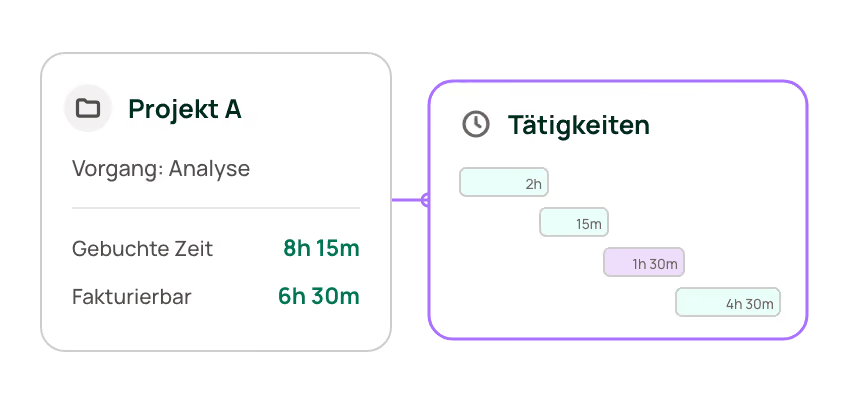
Break down projects into tasks and activities
Map the structure in which work actually happens. Evaluate hours, budget, and progress at every level.
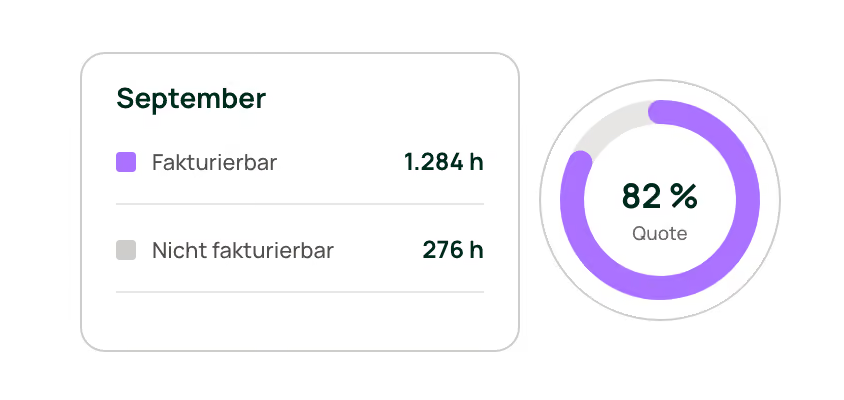
The difference that explains your margin
Mark hours as billable or non-billable and read your billing rate as a key metric instead of estimating it.
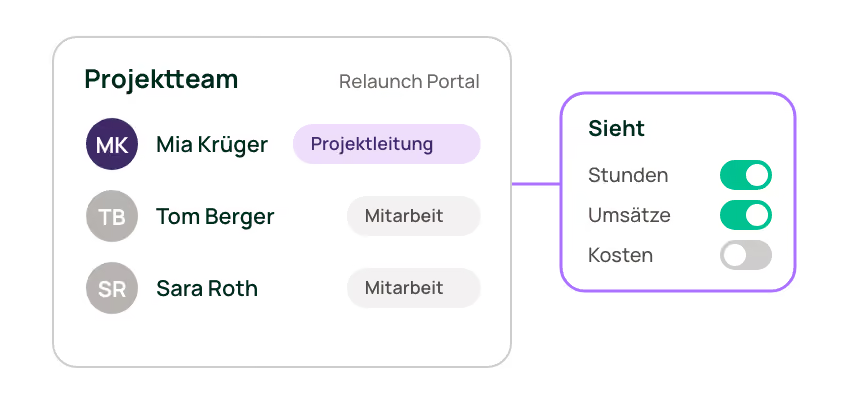
Who works on the project and who sees what
Assemble project teams, assign project managers and staff, and adjust staffing as project requirements change. Roles and permissions control who can log time to which projects and what data they can view.
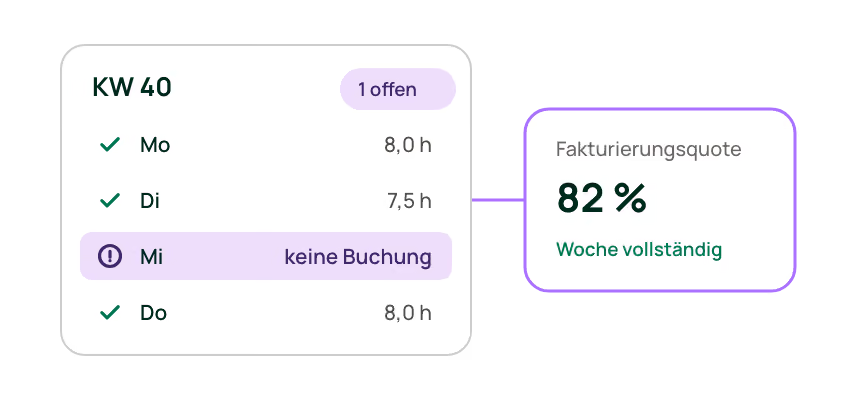
Key metrics based on complete data
Track working hours, project times, absences, and travel expenses conveniently from anywhere using the ZEP app.
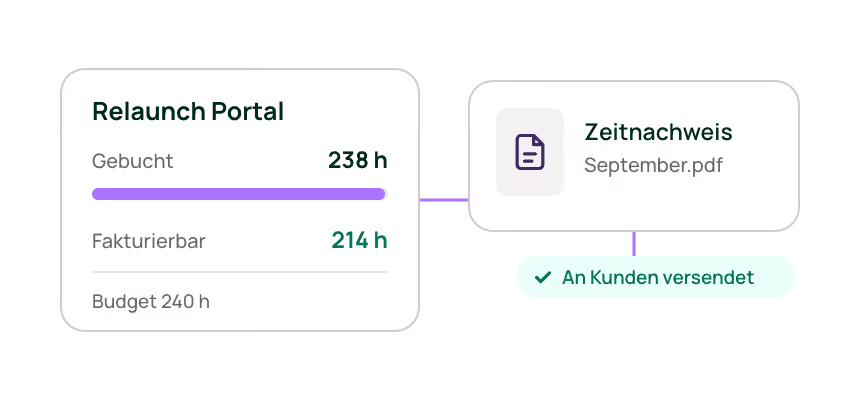
Performance reports derived from project management
Automatically create and send personalized timesheets based on the same entries you use to manage your projects.
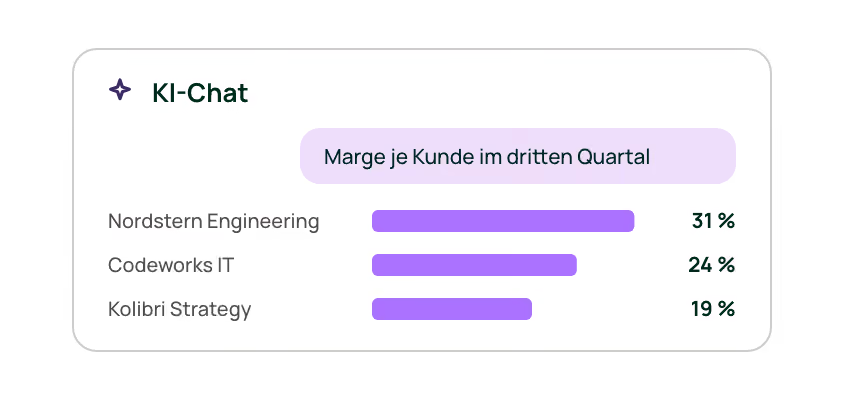
Log time and analyze projects via AI chat
Retrieve revenue, costs, and utilization via AI command from the same data your team uses for time entries.
An overview of all product lines
ZEP Control includes everything in ZEP Track, plus planning and commercial insights.
ZEP Track
Log time to projects and clients – and know exactly where your hours are going.
€12 with monthly payment
ZEP Control
Manage projects with key metrics, capacity utilization, and financial insights – no additional board tool needed.
25 € with monthly billing
ZEP Operations
The entire project lifecycle on a single data basis – from quote to invoice.
€35 with monthly payment
ZEP Business
Organization-wide management across multiple entities.
€45 with monthly billing
All prices per user per month, plus VAT.
Integrate ZEP into your setup
We ensure that ZEP is in harmony with the rest of your IT infrastructure.








Hubspot
Synchronize customer and project data

Personio
Time tracking with ZEP & HR with Personio - A perfect team: transfer ZEP time entries and Personio master data

Salesforce
Exchange customer data to avoid duplicate entries
FAQs
Frequently asked questions and answers about ZEP.
Which automation functions facilitate workflow and transparency in ZEP Compact?
ZEP Compact offers automatic reminders and tasks, such as stamping at the end of the day or notifications when there are minus hours. Time sheets are also created and sent automatically, which reduces administrative effort and improves traceability for customers.
How does ZEP Compact help with the flexible allocation of project staff and their roles?
ZEP Compact makes it easy to assign employees to specific projects and roles. Setting employee assignments and securely managing project roles reduce errors, promote structured project management and improve efficiency in project management.
What are the benefits of centrally managing and integrating customer data in ZEP Compact?
By integrating CRM systems such as HubSpot or Salesforce, customer data can be automatically transferred to ZEP Compact. This seamless connection eliminates manual duplicate maintenance, reduces errors and saves time, which improves data quality and management efficiency.
How does ZEP Compact support the detailed and efficient recording of project times?
With ZEP Compact, working hours can be precisely recorded at customer, project and sub-project level and billable and non-billable times can be identified. This improves the accuracy of time recording and promotes transparent project accounting, as it is possible to clearly allocate working hours to projects and activities.
Which systems can be connected to ZEP Track?
As many as you need. Third-party integrations are unlimited in every ZEP product line, including ZEP Track, with no quota and no tiering by plan. Ready-made integrations exist for DATEV, Personio and Lexware, among others. ZEP's own APIs (REST, SOAP) and single sign-on are included everywhere as well.
Does ZEP Track meet the legal requirements for working time?
Yes. Break rules, surcharges, working time models, overtime and absences are included in ZEP Track, as is the payroll export. ZEP is developed and hosted in Germany and is ISO 27001 certified.
Will the team actually book their hours?
This is the most common concern before rollout, and it can be addressed. Hours are booked in the browser, in the app, at the terminal or directly from a calendar entry, and automated tasks flag gaps before anyone has to follow up. One customer puts it this way: “The system was adopted quickly because there are no unnecessary hurdles.”
How does ZEP Track differ from a simple hours tool?
An hours tool records how long someone worked. ZEP Track also records what for: which client and which project the hour goes to and whether it is billable. The same booking feeds the budget overview, the time report for clients, the payroll export and the data basis for controlling and billing.
When is ZEP Track enough, and when do I need ZEP Control?
ZEP Track books and shows. ZEP Control plans and calculates: task management, project planning, revenue and costs. As long as you want to analyze your project business, ZEP Track is enough. Once you want to plan it and steer it by KPIs, ZEP Control is the right choice. You can switch at any time, and your data is retained.
What is the difference between ZEP Track and ZEP Clock?
ZEP Clock books working time only: clocking in and out, overtime, absences. ZEP Track also books what the time was spent on, meaning which project and which client. If you bill, cost or analyze projects, you need that allocation. ZEP Clock is a separate line, and a switch from it to the project-based lines is not provided for.
Who is ZEP Track for?
For service providers who currently keep their hours twice: once for payroll, once for project costing. Typically operations, team or commercial leads in smaller project-based firms who need compliant working time records and, at the same time, project and client hours that later hold up for controlling and billing.
What is ZEP Track?
ZEP Track is project time tracking for management consulting, IT consulting and engineering. Teams book their hours to clients and projects, budgets stay visible while the project is running, and absences and the payroll export run alongside. ZEP Track costs €9 per user per month on an annual contract, €12 on a monthly plan.
Try ZEP free for 14 days - full access to all features
ZEP is powerful, easy to use and can adapt to your needs. See for yourself!